Google Ads seems to have rolled out the "All conversions" tab within the Goals and Conversions section. This allows advertisers to make one less click, where they can avoid clicking on "View all conversion actions."
This was first spotted by Thomas Eccel who posted about it on LinkedIn and wrote, "You don't need to click on the "View all conversion actions" button anymore to have a clear view (including settings) of all your conversion actions." "There is a new submenu called "All conversions" that has been rolled out to quite some accounts now," he added.
Here is a screenshot from an account showing that button/tab:
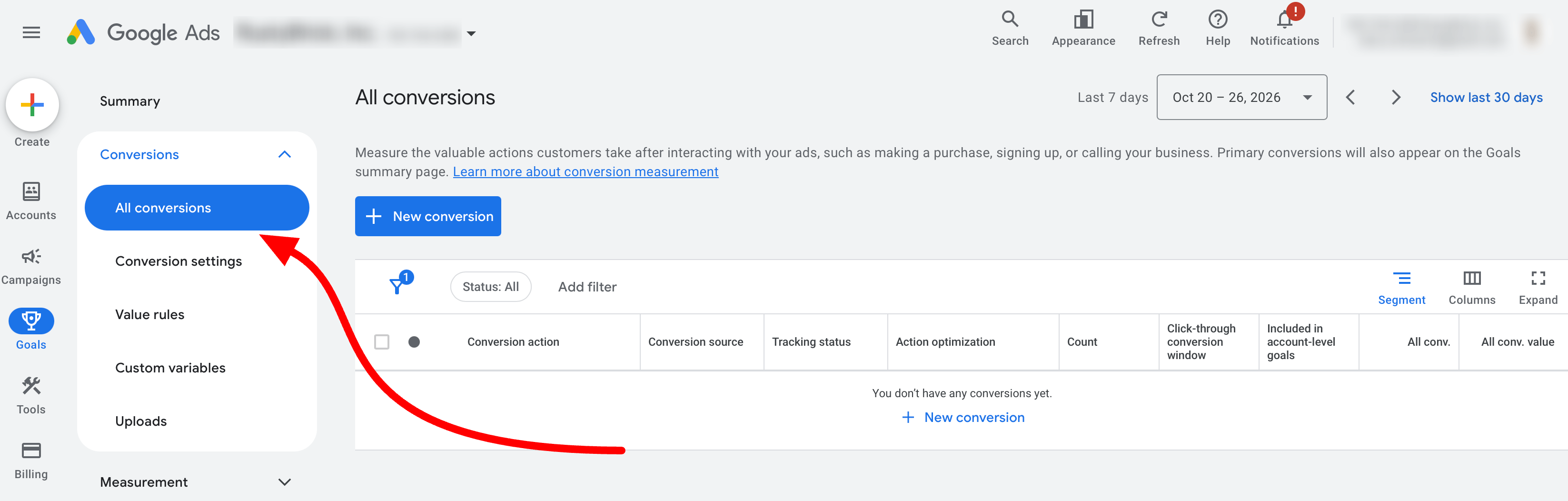
Hana Kobzová wrote on PPC News Feed, "Under the Goals section, the new All Conversions submenu provides a comprehensive view of conversion actions, including metrics like account-level goals, click-through windows, and primary/secondary status. Columns such as repeat rate and last seen are also now directly accessible."
I found a screenshot of the All conversions tab from a blog post from about a month ago. So I am not sure exactly when it went fully live.
Forum discussion at LinkedIn.