
Google added the ability to add lead scoring by indicating answers that qualify a lead for your business to get higher-quality leads. You can add up to 12 answers per question and check off whether they qualify under the lead scoring section. This is for the newish Google Ads lead management feature.
This was posted by Hana Kobzová on PPC News Feed via Dafne Nazar who wrote, "Google Ads has added an option to mark specific answers as qualifying leads when creating custom questions in Lead Form assets."
Here is the screenshot:
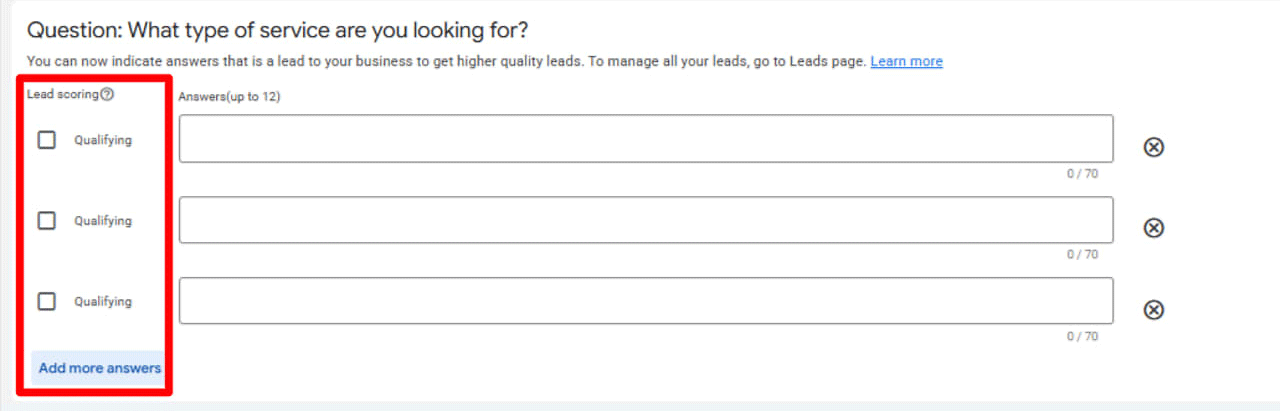
It says, "You can now indicate answers that is a lead to your business to get higher quality leads. To manage all your leads, go to Leads page."
Hana explained, "When setting up a custom question, advertisers can now select which answers qualify as valuable leads. Google explains that this option is designed to help businesses get higher quality leads, with lead management available through the Leads page.Screenshot of Google Ads lead form question builder showing lead scoring options for qualifying service types with multiple answer fields and character limits."
To find this setting, go to Assets > Lead Form > Create Lead Form > Custom Questions, create a question, and add answer options.
Forum discussion at LinkedIn.