
Microsoft Advertising has rolled out the Ad Preview Hub to now support Performance Max campaigns. Microsoft Advertising Ad Preview Hub launched for other campaigns this past January and is now supported for PMax campaigns.
The Microsoft Ad preview hub is a centralized tool that lets you see what your ads will look like before your campaign goes live. It's designed to simplify the ad review process and help you make sure your ads appear as expected across devices, placements, and publishers. The previews reflect what your customers will see during ad delivery.
Navah Hopkins, the Microsoft Ads Liaison, announced this on LinkedIn saying, "Thrilled to share Ad Preview Hub is live in Microsoft Advertising PMax campaigns!"
Previously, only MSN and Outlook were supported but now Bing Search is in the drop down list:
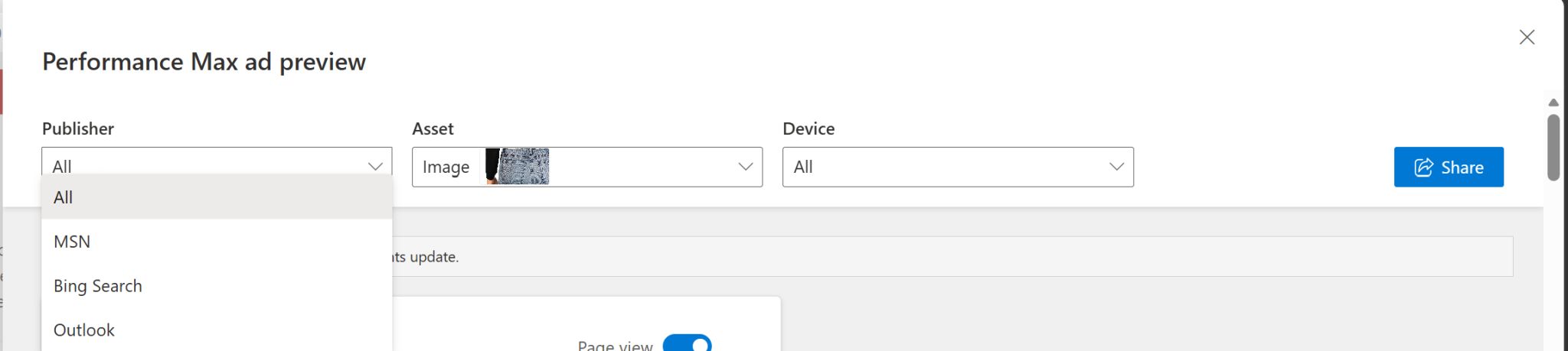
Navah then dug into what the Ad Preview Hub does, she wrote:
Ad Preview Hub allows you to see previews of all asset types on eligible surfaces and devices. This view makes it easier to get sign off on creative with stakeholders and clients through a sharable link. No one except the link generator and those who get sent the link can access the link.Here's how to access it:
In the asset group editor, click into "Preview ads". This button is all the way to the left over the image preview. You can then adjust the settings as shown in the screenshot and generate the link with the blue "share" button on the right.
Here's why to leverage it:
1. PMax needs flexibility to adapt to AI surfaces. By sharing how the assets will appear, you can make it easier to get sign off on the ad type.
2. Assets need to be able to stand on their own as well as pair with others. By going through the preview, you can understand if any are missing the mark.
3. This is a fast and secure way to get sign off from stakeholders. Rather than needing to take screenshots or import in files to third party tools, you can share a single link directly with approvers who may want to see different placement/asset combinations.
There is a much larger help document over here.
Forum discussion at LinkedIn.